QR Code Generator for Business
Track every scan in real time
Create dynamic QR codes you can update, brand, and track, all from one dashboard. Built for marketing teams, agencies, and business owners who print at scale.
- No credit card required
- Update links after printing
- Track every scan in real time
- Download print-ready SVG, PNG, or PDF
Trusted by 2,000+ businesses & organizations






Quick QR Code Generator
Create your first QR code in seconds
Features
Why Use This QR Code Generator?
A free QR code generator gets you a code. QR-Kode gets you a code that works three months after your campaign launches, tells you who scanned it, and looks like it belongs on your brand materials.
-
Dynamic QR Codes You Can Update Any Time
Print a QR code once. Change where it points anytime. No reprints needed for flyers, menus, or labels.
Each QR-code uses a short redirect link. The printed design stays the same. You update the destination from your dashboard in seconds.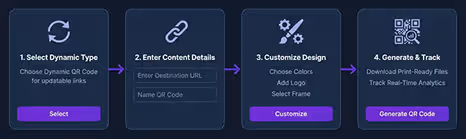
-
Scan Tracking That Justifies Every Campaign
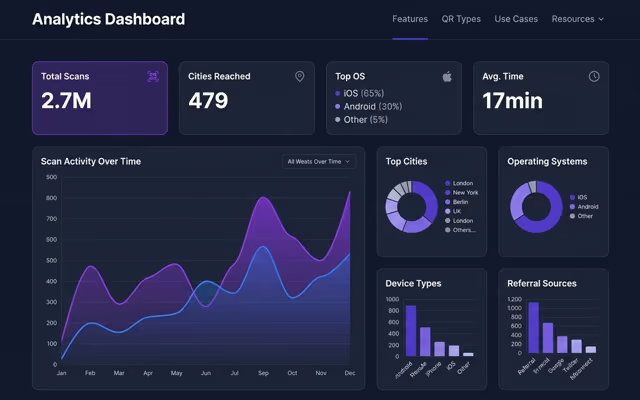
Track total scans, unique scans, locations by country and city, device types, and scan times. Every metric updates in real time.
Your paid media reports cover online clicks. This fills the gap for offline channels like print, packaging, and signage. -
Custom Branding With Your Logo and Colors
Add your logo, pick your brand colors, choose a frame style, and shape the dots. Every code looks like it belongs to your brand.
The finished QR code fits right into your packaging, print materials, and digital ads. No generic black-and-white squares. -
16 QR Code Types in One Tool
Create QR codes for URLs, vCards, WiFi, payments, events, WhatsApp, and more. One platform handles all 16 types.
One account covers every use case. Share it across your team, clients, or campaigns without switching tools. -
Print-Ready Files Every Designer Needs
Download as SVG for sharp print at any size, PNG for screens, or PDF for direct press handoff. Pick the format that fits your workflow.
No extra conversion steps. The file goes straight from the QR code generator to your designer or printer. -
Team Access and Campaign Organization
Invite team members and organize codes by campaign or client. One shared dashboard keeps everything in one place.
Free generators give you a single code with no structure. This gives your team a system they can grow with.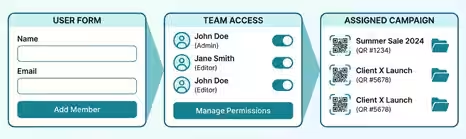
How It Works
Three Steps to Your First QR Code
Going from sign-up to a live, trackable QR code takes under two minutes. Here is exactly what that looks like.
-
Choose Your QR Code Type
Pick from 16 content types including URL, vCard, WiFi, payments, and events. Just select the type and enter your content.
The QR code generator builds your code right away. No setup, no waiting. -
Brand It and Make It Yours
Add your logo, pick your brand colors, and choose a frame or dot style. Make the code look like part of your brand.
The preview updates in real time as you make changes. What you see is what you download. -
Download, Print, and Track
Export as SVG, PNG, or PDF. Send the file straight to your printer or designer with no extra conversion steps.
Scan data starts showing up in your dashboard the moment someone scans your code. Every scan is tracked from day one.
Free to start. No credit card needed.
QR Code Types
16 QR Code Types
One QR Code Generator
QR-Kode supports 16 content types, covering communication, navigation, networking, and payments. Each type is built for a specific real-world action, so scanners get exactly what they need without extra steps.
-
Most Popular
Website URL
Link any QR code to a website, landing page, or online resource. This is the most used QR code type in print advertising, packaging, and digital signage worldwide.
With a dynamic URL code, you can change the destination anytime without reprinting. Run an A/B test, swap a seasonal offer, or fix a broken link. The printed code stays the same.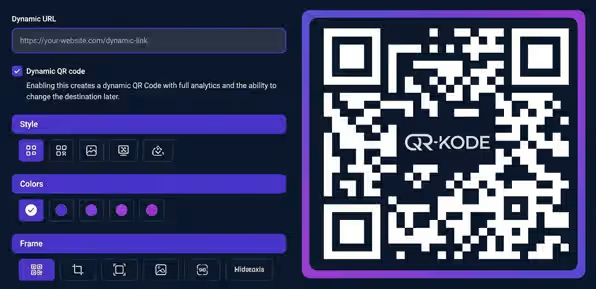
-
Offline Ready
Text
Encode text directly into the QR code. No URL, no internet connection. The content lives inside the code itself.
This makes it a strong fit for product instructions, serial numbers, and short messages. It works in warehouses, on packaging, and on labels where internet access is unreliable or unavailable. -
Networking
Phone
Opens the dialer with your number pre-filled. Customers call your sales line or support team straight from a flyer or business card.
No copying, no searching. One scan and the call connects. Great for local businesses, service providers, and customer-facing signage. -
Direct Call
SMS
Opens the SMS app with your number and a draft message ready to send. The customer just taps send. No typing needed.
Use it for opt-in campaigns, appointment reminders, loyalty sign-ups, or feedback collection. It works from any printed surface. -
Messaging
Email
Opens the email app with the address, subject line, and body already filled in. The recipient just hits send.
Place it on product packaging, receipts, or event materials. It removes the friction from feedback forms, contact requests, and support tickets. -
Connectivity
WiFi
Guests scan and connect to your WiFi without typing a password. No more spelling out long network names or credentials at the front desk.
Update the network details from your dashboard anytime. The printed QR code stays the same. A standard setup in cafes, hotels, co-working spaces, and conference venues. -
Communication
WhatsApp
Opens a WhatsApp chat with your number and an optional pre-filled message. Customers scan and land in a conversation right away.
Skip the phone tree. Place it on tables, flyers, packaging, or storefront signage. Popular in hospitality and retail for direct customer contact. -
Chat
FaceTime
Starts a FaceTime call on Apple devices. One scan opens the video call with no contact exchange needed.
A good fit for premium support desks, showrooms, concierge services, and personal consultations. Place it anywhere your Apple-using customers need a direct video line.
Comparison
Static vs Dynamic QR Codes
Static QR codes store data directly in the pattern, so they cannot be changed after printing. Dynamic QR codes store a short redirect URL, so you control the destination at any time. For campaigns, menus, packaging, or anything that might change, dynamic is the only practical choice.
| Feature | Static QR Best for personal, one-time use |
Dynamic QR
Recommended
Best for business, campaigns, and anything that changes
|
|---|---|---|
| Edit destination | ✗ Fixed forever | ✓ Change anytime |
| Scan analytics | ✗ No tracking | ✓ Full dashboard |
| Custom branding | Set once, can't update | ✓ Update anytime |
| Link lifespan | ✓ Works forever | ✓ Active on all plans, no expiry |
| File formats | ✓ SVG, PNG | ✓ SVG, PNG, PDF |
| Scan limit | ✓ Unlimited | ✓ Unlimited |
| A/B testing | ✗ Not possible | ✓ Built-in |
| Password protection | ✗ Not available | ✓ Optional |
Use Cases
Built for Every Industry
QR codes work across industries. The way they are used depends on context. These are the real applications QR-Kode customers run every day.
-
For Restaurants and Cafes
- Update daily specials without reprinting the menu
- Share WiFi credentials with a single scan, no staff needed
- Link to your Google review page and collect reviews before guests leave
-
For Retail and E-Commerce
- Link packaging to product guides, warranty registration, or upsell pages
- Swap the destination URL on shelf labels for seasonal promotions
- Track which store locations or product lines get the most scans
-
For Events and Venues
- Print codes on badges and tickets that link to schedules, maps, or sessions
- Add conference sessions to attendee calendars with one scan
- Track peak scan times to see when and where attendees engage
-
For Real Estate Agents
- Link for-sale signs to virtual tours, floor plans, and listing pages
- Reuse the same sign when a property sells or a new listing goes live
- Report scan data by property to justify marketing spend to vendors
Analytics
Analytics That Prove
Your Print Works
Every dynamic QR code includes a real-time analytics dashboard. You see exactly who scanned, where, when, and on what device. This is the data your offline campaigns have been missing.
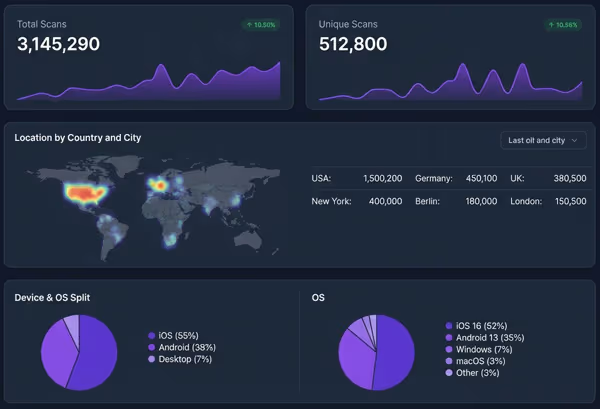
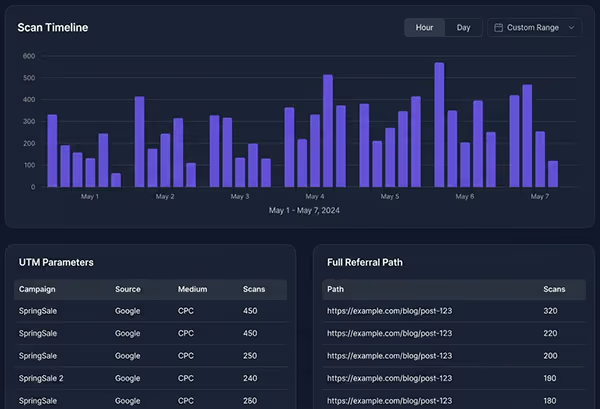
Track every scan from your dashboard. Export reports anytime.
Security
Security, Privacy & Reliability
QR-Kode is operated from Norway and built to meet GDPR requirements. Scan analytics collect aggregated data only. No personal information is stored inside the QR code, and nothing is captured from scanners without explicit consent.
-
Data Stored in Norway, GDPR Compliant
All data is stored on servers based in Norway and processed in line with GDPR. QR-Kode does not sell user data or share analytics with third parties.
-
No Personal Data Inside the QR Code
The QR code pattern contains only the redirect URL. No scanner data, no cookies, and no tracking pixels are embedded in the code file you download or print.
-
HTTPS Redirects and Graceful Expiry
Every redirect runs over HTTPS. If a subscription lapses, dynamic codes show a notification page instead of a broken link. Your printed materials never silently fail.
Testimonials
What Our Users Say
-
“Setup took five minutes. I created a dynamic QR code for our product packaging and changed the destination URL twice in the first week. No reprints needed.”
Adam E.Managing Director, Hospitality Group -
“We put QR codes on every flyer and menu. The scan tracking shows us which locations perform best. We stopped guessing and started measuring.”
Thomas A.Director, Digital Marketing Agency -
“We added QR codes to our packaging that link to the online store. Traffic from print went up 34% in the first month. The codes took less than a minute to create.”
Maria M.Senior Agent, Digital Marketing Firm -
“Sharing new campaigns used to mean updating five different channels. Now we update one URL in the dashboard and every printed code points to the right place.”
Henriette T.Scandinavian Manager -
“Our passengers scan codes at bus stops to check routes and schedules. We update the information weekly without replacing a single sign. Customer complaints about outdated info dropped fast.”
Lillian B.Marketing Manager -
“We share weekly offers through QR codes on our counter displays. Customers scan, see the latest deals, and we update the page every Monday morning. Took our team ten minutes to learn.”
Tommy T.Head of Customer Service
By the Numbers
QR-Kode at a Glance
-
16QR code content types
-
5International payment standards
-
4Export formats: SVG, EPS, PNG & JPG
-
∞Unlimited scans on all plans
-
HTTPSEvery redirect encrypted
-
GDPRHosted in Norway, fully compliant
FAQ
Frequently Asked Questions
Quick answers to the most common questions about QR-Kode.
A dynamic QR code uses a short redirect URL instead of encoding the destination directly. This means you can change where the code points after printing. You can also track scans, see location data, and update branding from your dashboard. Static QR codes cannot do any of this.
Yes. Dynamic QR codes on QR-Kode let you change the destination URL at any time. The printed code stays the same. You make the change in your dashboard, and every future scan goes to the new URL. There is no limit to how many times you can update it.
Select your QR code type and enter the destination. Then open the design editor. You can upload your logo, set your brand colors, choose a frame style, and change the dot shape. The preview updates in real time. Download when you are satisfied.
Static QR codes never expire. They work as long as the destination URL is live. Dynamic QR codes stay active as long as your QR-Kode subscription is current. If a subscription lapses, the code shows a notification page instead of a broken link.
Every dynamic QR code includes a real-time analytics dashboard. You see total scans, unique scans, location by country and city, device type, operating system, scan time, and referral path. You can filter by date range and export the data.
Yes. The free plan lets you create static QR codes with full design options and one dynamic QR code with scan tracking. Paid plans add more dynamic codes, advanced features, and team access. See the pricing page for a full breakdown.
QR-Kode supports SVG, EPS, PNG, and JPG exports. SVG and EPS are resolution-independent and best for print. PNG and JPG work well for screens, email, and social media. All formats are available on every plan.
Yes. QR-Kode is operated from Norway and stores all data on Norwegian servers. Scan analytics collect aggregated data only. No personal information is stored inside the QR code. No data is captured from scanners without explicit consent. QR-Kode does not sell or share user data with third parties.
Static QR codes store the destination directly in the pattern. They cannot be edited or tracked after creation. Dynamic QR codes use a short redirect link. You can change the destination, track every scan, add UTM parameters, set up A/B tests, and password-protect the link. Dynamic codes are the better choice for any business or marketing use.
Yes. QR-Kode supports five international payment standards: PayPal, UPI (India), PIX (Brazil), EPC/SEPA (Europe), and cryptocurrency wallets including Bitcoin and Ethereum. Each payment type generates a code that opens the correct payment app on the scanner's phone.
Start Creating QR Codes Your Audience Will Scan
Free to start. No credit card required. Upgrade when you are ready.